Guides
NICE DVR: archive and timeshift
NICE DVR records the channels you choose so that subscribers can watch back (archive, timeshift). It runs on the panel's server or on a separate one; an existing Ministra or Flussonic DVR can be connected too.
Three kinds of DVR
| Type | When |
|---|---|
| Nice DVR | The panel's own recorder (ndvr) – records the channels you set and serves the archive. The local one (id 100) is already installed with the panel; more can be installed on other servers over SSH. |
| Ministra DVR | You already have a working Ministra/Stalker archive – the panel only points to it. |
| Flussonic DVR | You already record with Flussonic – the channel is linked by its Flussonic name. |
1Keys for the panel and the DVR
The panel and Nice DVR talk to each other with the Web API key: Configuration → WEB management → Wapi aes key:iv → Generate → Save (once; if it is already set, keep it).
2DVR servers
Channels → DVR. The number in green = the DVR answers (the answer time is next to the address), red = it does not; Refresh state checks again.
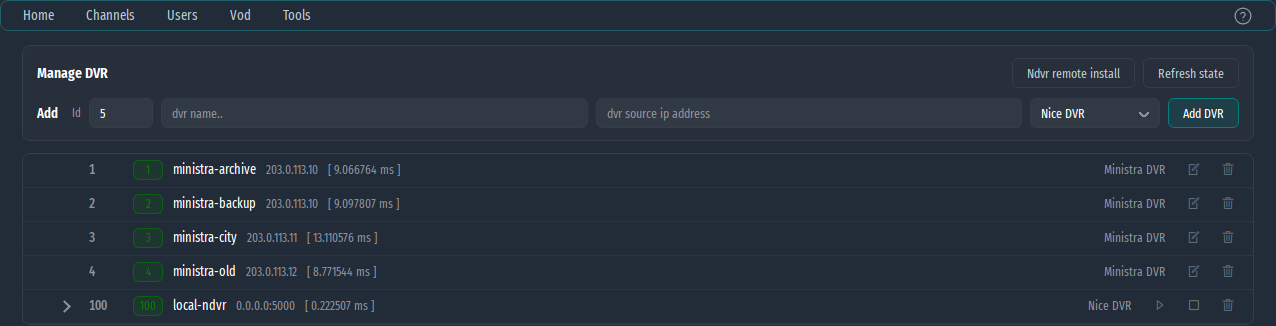
- The local ndvr (id 100) – the › arrow opens its management: CPU, RAM, disks (the recording partition), the recorded channels with used space and available hours, who is watching the archive, its settings and restart.
- A Nice DVR on another server – Ndvr remote install: IP, SSH port, user (root), password, a name and a web port. The panel installs it over SSH and adds it to the list; the output is shown in the window.
- Ministra or Flussonic – Add: Id, name, address (IP:port) and type Ministra DVR / Flussonic DVR.
3Record a channel
In the channel form (✎ at the channel) → Channel DVR:

| Field | What to enter |
|---|---|
| Dvr server | The DVR from the list (Off = no recording) |
| Channel id/name | Nice/Ministra DVR – the channel ID; Flussonic – its name in Flussonic |
| Rec duration | Nice DVR – how many hours back are kept |
| Dvr source | Nice DVR – the address it records from. If the DVR cannot reach the source, give it the channel through the panel: a subscriber for the DVR and the channel's address on the panel. |
Save. In a few seconds the channel appears in the DVR's channel list and the recording starts.
4Watching the archive
- MAG / Stalker – the archive appears in the portal for the recorded channels.
- SIPTV lists and apps – the recorded channels get
catchupandcatchup-daysin the playlist. - How many days of programme the APIs give: Configuration → SYSTEM → EPG api duration.