Guides
Move the panel to another server
How to move a working panel to a new server. The new panel connects to the old one over SSH and copies everything 1:1: channels, subscribers, settings, EPG, icons and, if you want, the VOD files and the DVR recordings. At the end the old panel stops and the new one takes over the subscribers.
Before you start
- A registered profile with a paid license. The license of the old panel must be in a profile on nice-panel.com (My account, with the e-mail of the license). A panel with a demo license cannot be moved.
- A new server with a freshly installed panel. The move replaces all the data there, so it is possible only while the setup wizard is not finished yet. Installation – Install.
- Access to the old server over SSH as
rootwith a password: IP or domain and the SSH port (usually 22). - Internet on the new server – the license is checked on nice-panel.com.
- Space. The new server must hold the panel data and, if you move them, the VOD files and the DVR recordings. The check (step 3) shows how much is needed and how much is free.
- Hardware reset of the license. The license is tied to the server. On nice-panel.com → My account → the license → hardware (HWID) reset. Do it just before step 4 – after the move the new server takes the license on its first check.
The files, VOD and DVR are copied while the old panel keeps working – the subscribers notice nothing. The interruption is only at the end: the old panel stops, the database is copied and the new one restarts. Usually a few minutes.
1Open the wizard on the new server
Log in to the new panel with the user admin and the password the installer showed. The setup wizard opens. Choose the language and click Move from another panel.
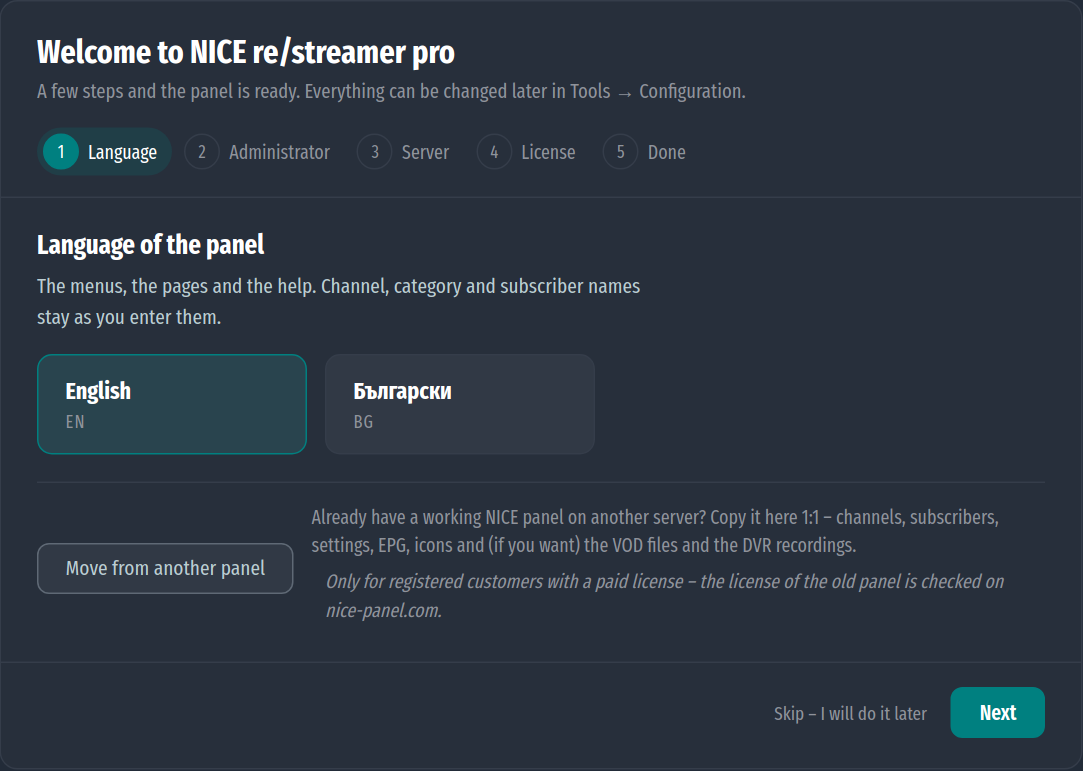
2Enter the old server
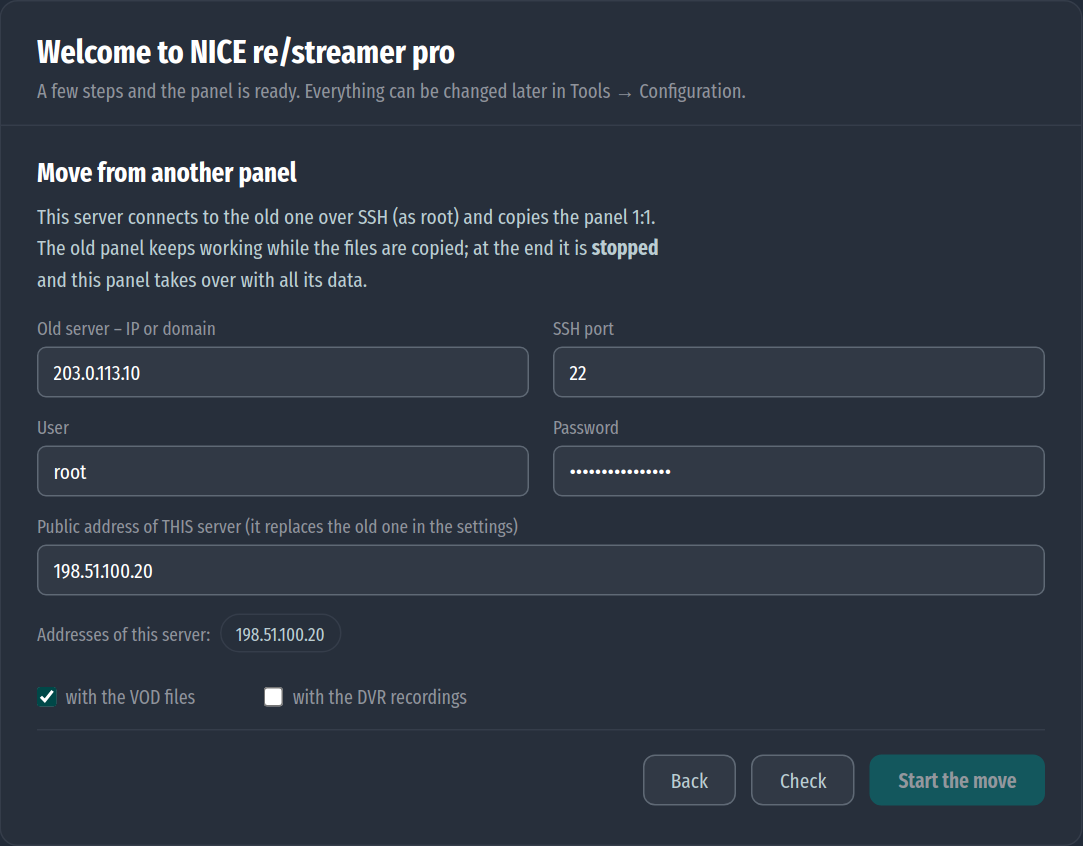
- Old server – IP or domain, SSH port, User (
root) and Password – for the SSH connection to the old server. The password is not stored anywhere. - Public address of THIS server – it replaces the address of the old server in the settings (playlists, portal). Below are the addresses the new server sees on itself – a click fills one in. If you use a domain, leave the IP – you will point the domain later.
- with the VOD files / with the DVR recordings – tick them if you want them copied too. Without a tick only the records in the database move.
3Check
Click Check. The new server connects to the old one, checks its license on nice-panel.com and shows what it found.
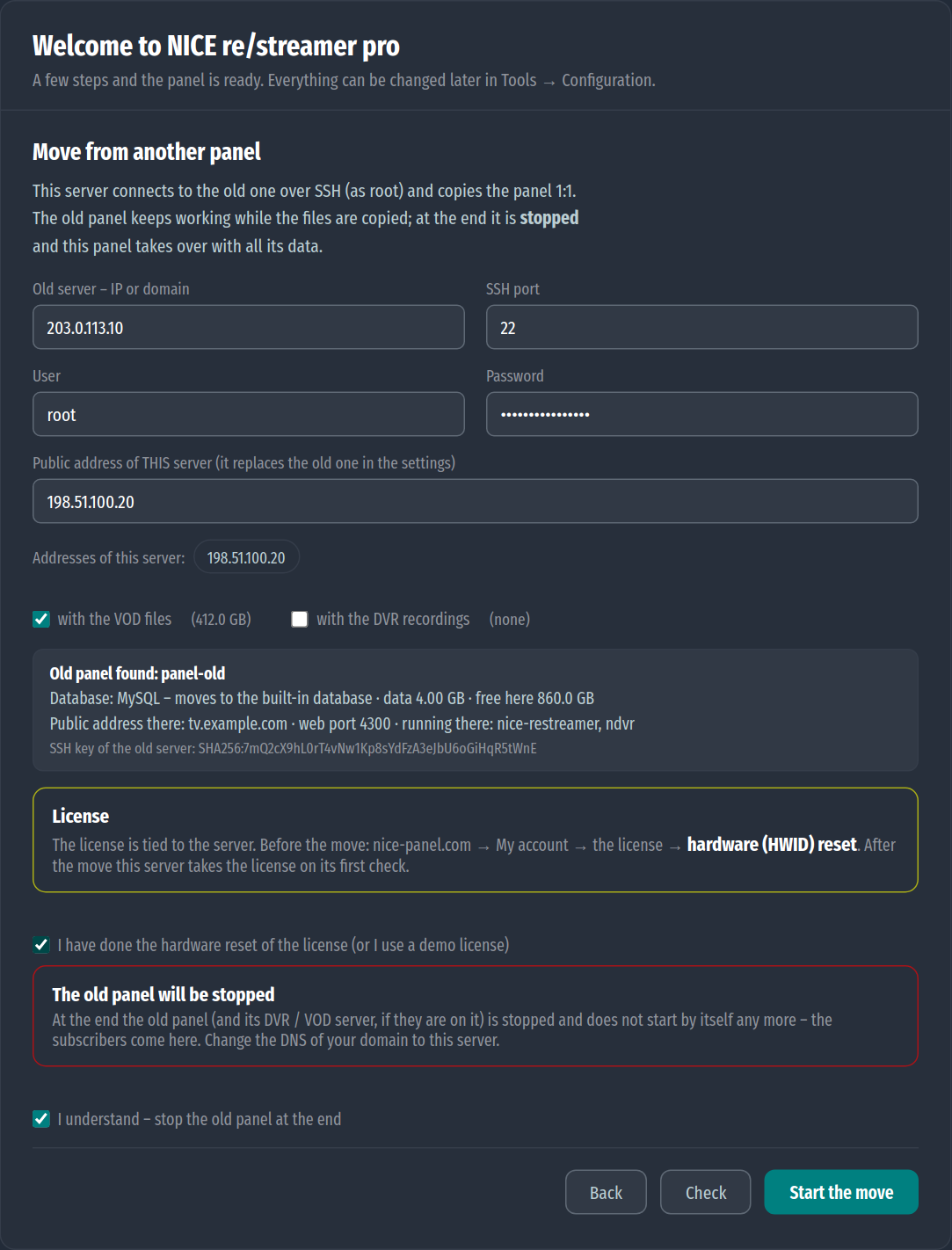
- Old panel found – the name of the old server.
- Database – the built-in one is copied as it is; MySQL moves to the built-in database (the new server does not need MySQL).
- data / free here – how much will be copied and how much space there is. If there is not enough, the move does not start.
- next to the VOD and DVR ticks – their size on the old server.
- Public address there, web port, running there – the settings and services of the old server.
- SSH key of the old server – the key fingerprint. If you know your server, compare it (
ssh-keygen -lf /etc/ssh/ssh_host_ed25519_key.pubon the old server).
Below the result there are two warnings. Tick them after reading:
- License – you confirm the hardware (HWID) reset is done.
- The old panel will be stopped – at the end the old panel (and its DVR / VOD server, if they are on the same machine) stops and does not start by itself any more.
4Start the move
Click Start the move. The steps run one after another. The page shows the progress – you can close it and open it again, the work goes on.
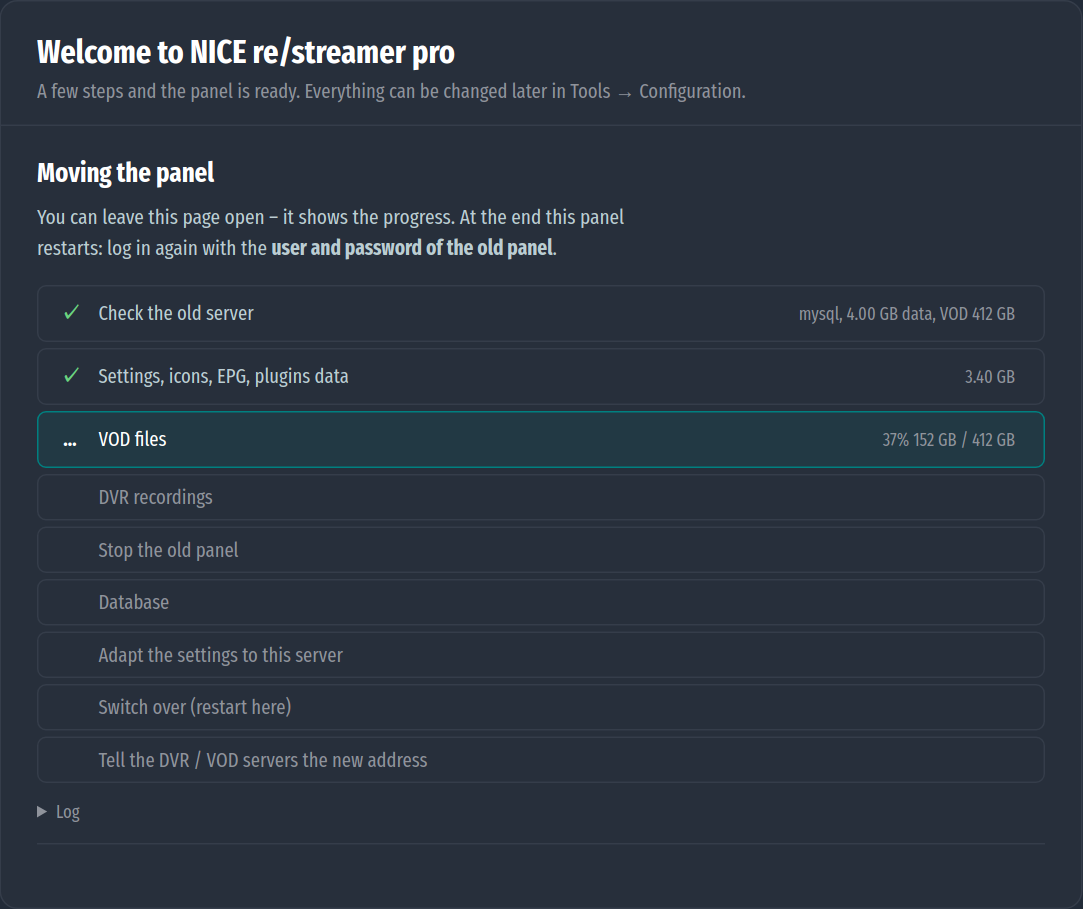
| Step | What happens | Old panel |
|---|---|---|
| Check the old server | connection, sizes, license | running |
| Settings, icons, EPG, plugins data | the panel files | running |
| VOD files / DVR recordings | only if ticked – the longest part | running |
| Stop the old panel | the old panel and its services are stopped and disabled | stopped |
| Database | a copy of the database at the last moment – nothing is lost | stopped |
| Adapt the settings to this server | the new address, listening on all interfaces, the server keys | stopped |
| Switch over (restart here) | the new panel starts with the moved data | stopped |
| Tell the DVR / VOD servers the new address | separate Nice DVR and VOD servers learn the new address by themselves | stopped |
The detailed log is under Log on the page and in the file /nice/logs/migrate.log on the new server.
5Log in to the new panel
At the restart the page takes you to the login. Log in with the user and password of the old panel – the data are its data now. The wizard shows the result:
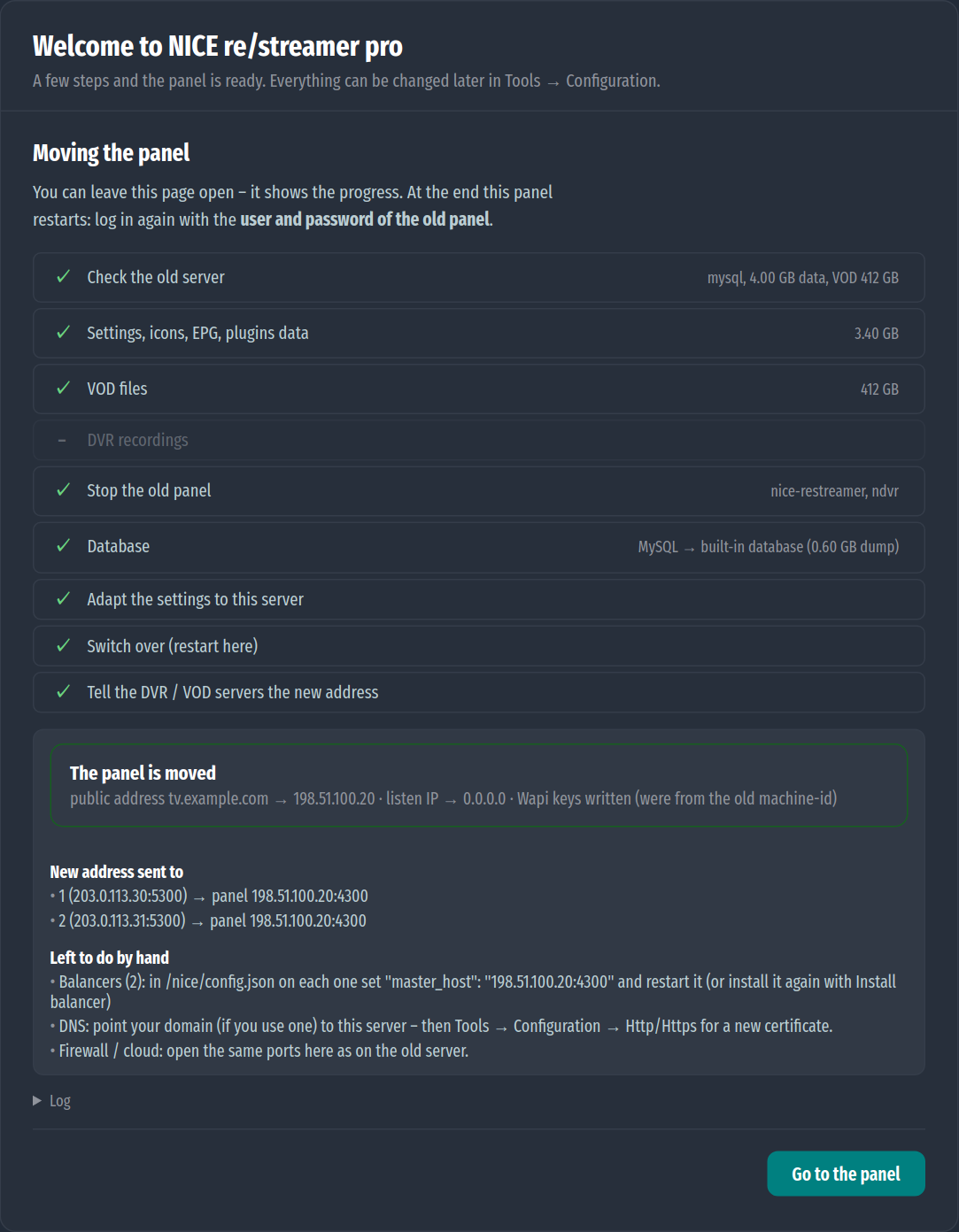
- The panel is moved – what was changed in the settings (address, interface, keys).
- New address sent to – the separate Nice DVR and VOD servers. They must be updated to a version from 21.11.2026 or newer; older ones are pointed by hand.
- Left to do by hand – see the next step.
6Finish by hand
- DNS. If the subscribers use a domain, point it to the new server. Then Tools → Configuration → Http/Https – for a new certificate.
- Firewall / cloud. Open the same ports on the new server as on the old one (web, MPEG-TS, HLS, Xtream, Stalker etc.).
- Balancers (slaves). On each slave – the new address of the master: Configuration → Balancer → master, or in
/nice/config.json"master_host": "NEW_IP:web port"and a restart. You can also install it again with Install balancer. The wizard shows the exact line. See Master and slaves. - Check. Play a few channels and VOD, open a playlist of a subscriber, check the EPG and the recordings.
If something goes wrong
| Message | What to do |
|---|---|
| SSH: wrong user or password | check the root password; the old server must allow password login over SSH |
| There is no NICE panel on the old server | there is no panel at this address (/nice/config.json) – check the IP and the port |
| The old panel has a demo license / is not in a registered profile | register on nice-panel.com (My account) with the e-mail of the license; moving is for paid licenses |
| nice-panel.com is not reachable | the new server has no internet or DNS – fix it and try again |
| Not enough space here | free some space or untick VOD / DVR |
| The old panel uses MySQL, but mysqldump is missing | on the old server: apt install mariadb-client (or mysql-client) |
If the error is before the step Stop the old panel, the old panel keeps working – fix the cause and click Start the move again.
If the old panel is already stopped and you want it back: on the old server systemctl enable --now nice-restreamer (and ndvr, if there is a DVR). Its data are untouched – it starts as before.